Tap Settings in the bottom bar of the Cuebly app. From top to bottom you find:
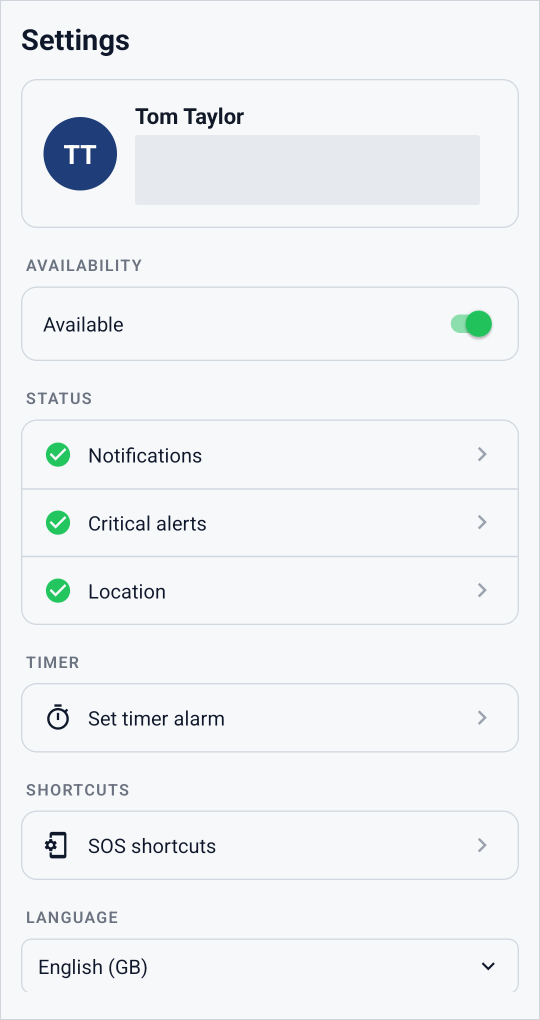
Settings in the Cuebly app.
¶ Your account
Your name, your email address and the device number of this app. Support may ask for the device number.
¶ Availability
The Available switch. When it is on, you receive messages and assistance requests. You find the same switch on the Home screen. See Availability, presence and connection.
¶ Status
Shows whether the app has the permissions it needs:
- Notifications
- Critical alerts
- Location
A green check mark means the permission is given. Tap a line to open the phone settings and fix it.
¶ Timer
Set timer alarm starts a timer that raises an alarm if you do not cancel it in time. See Timer alarm.
¶ SOS shortcuts
Ways to send an alarm without opening the app:
- iPhone with an Action button: set the Action button to a Cuebly shortcut. See Send an alarm with the app: Action button.
- Phones with an SOS button, such as the Samsung XCover and RugGear phones, are supported too. See Send an alarm with the app: XCover side button.
¶ Language
Choose the language of the app. The app has the same 10 languages as the platform. The language of the app does not depend on the language of your phone.
¶ Theme
Switch between Light and Dark.
¶ Logout
Logs you out of the app.
At the bottom, Version shows the version of the app.