When you need help, the Cuebly app sends an alarm to the platform, with your location. The person who handles alarms for your organisation sees it at once.
¶ With the Send help! button
- Open the app. Send help! is the large red button on Home.
- Press and hold the button for 3 seconds.
A short tap does nothing. This prevents alarms from a phone in your pocket.
The app confirms with "Alarm is sent". The alarm arrives on the platform within a few seconds, as an SOS button alarm with your device name, the time and your location.
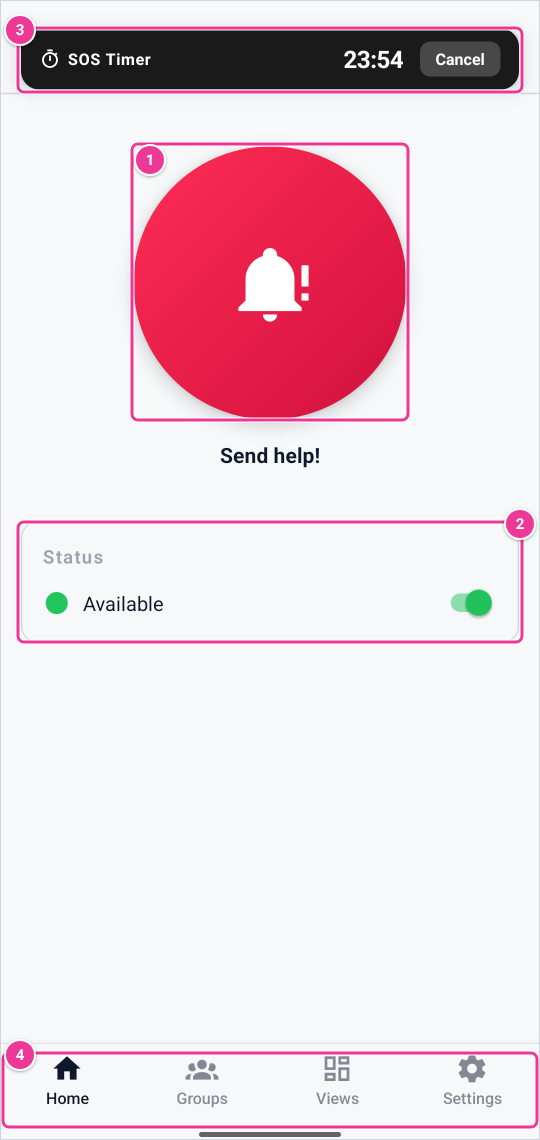
Hold Send help! for 3 seconds to send an alarm (1). Switch your availability under Status (2). A running timer alarm shows at the top, with Cancel (3). The bottom bar (4) leads to Groups, Views and Settings.
¶ With the Action button of an iPhone
On an iPhone with an Action button (iPhone 15 Pro and Pro Max, all iPhone 16 models and the iPhone 17 models) you can send an alarm with that button, without opening the app. You need iOS 18 or later.
- In the Cuebly app, open Settings > SOS shortcuts and tap Open Shortcuts.
- In the Shortcuts app, create a new shortcut, name it (for example SOS) and add the Cuebly action Cue SOS.
- In the iPhone's Settings > Action Button, swipe to Shortcut, tap Choose a Shortcut and select your shortcut.
Pressing the Action button now sends the same alarm as Send help!.
¶ With the side button of a Samsung XCover
On a Samsung Galaxy XCover phone you can use the programmable side button, also when the app is in the background. In the phone's settings, set the side button to open the Cuebly app; the app needs no setting for it.
- Press and hold the side button.
- The phone vibrates when you press, then gives four short pulses as a warning.
- Keep holding: after 3 seconds the phone vibrates long, and the alarm is sent.
Let go before the long vibration to cancel.
¶ What happens next
- The alarm appears in Alerts in the customer environment and can start scenarios, for example a message to colleagues nearby.
- The app may open a voice connection, so the person who handles the alarm can hear you. This is set per device by your administrator (Voice connection on alarm in DevCon).
¶ Tips
- Give the app permission to use your location all the time. With a location fix, the alarm arrives faster and with your position.
- Test the alarm together with your administrator, so they know it is a test.